What is Purple+ Flow?
Purple+ Flow drafts a custom weekly mix of blogs, emails and social posts from your brand — ready for one-click approval in Reviews. Here's how it works.
Purple+ Flow is marketing on autopilot. Every week, Purple+ drafts a custom mix of blogs, emails, and social posts based on your brand — without you asking for any of it. The drafts land in Reviews, ready for one-click approval.
It's the second way of using Purple+. The chat is for when you want something specific, right now. Flow is for making sure your marketing keeps happening even when you're busy with everything else.
You choose the weekly mix
Flow isn't a fixed package — you decide what it produces each week. In the Weekly mix, set how many of each you want:
-
Blog posts — how many articles to draft for your website
-
Emails — how many campaigns to draft for your email platform
-
Social posts — how many captioned, on-brand posts to draft
A running total per week updates as you adjust the numbers, so you always know how much content Flow will create. Want a quiet week of two social posts, or a heavy week of a blog, an email, and five posts? Both are a couple of clicks.
Everything Flow drafts is built from your Brand Kit — your colours, voice, audience, and rules — the same as anything you'd ask for in chat.
Rotated social platforms
For social posts, you pick which platforms Flow draws from — LinkedIn, Instagram, Facebook, Twitter/X, and more. Flow rotates through your selected platforms across runs, so your presence stays varied instead of posting the same thing everywhere every time.
How it works
-
Enable weekly Flow from the panel on your main dashboard, and pick your day, time, and timezone — say, every Monday at 08:00.
-
Set your Weekly mix — the number of blogs, emails, and social posts, and the social platforms to rotate through.
-
Flow runs automatically at your chosen time and drafts the mix you set.
-
Drafts land in Reviews, where you approve each one with a single click.
-
Optionally, turn on auto-schedule to line items up at your chosen day and time.
You can also hit Run now at any point to trigger a run on demand, and the panel always shows when Flow last ran and when it runs next.
The Flow controls
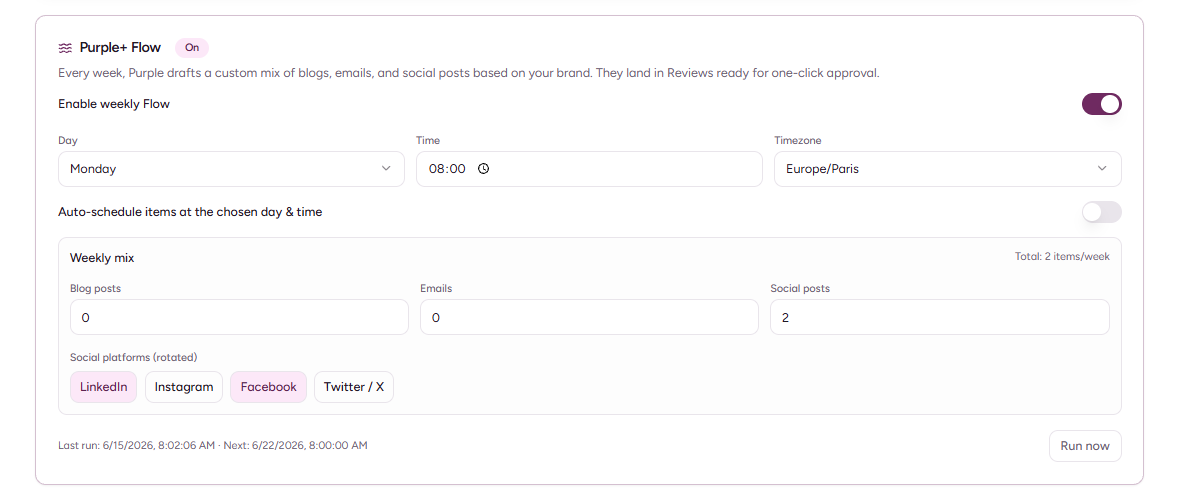
Everything lives in the Purple+ Flow panel on your dashboard:
|
Setting |
What it does |
|---|---|
|
Enable weekly Flow |
Turns the weekly run on or off |
|
Day / Time / Timezone |
When Flow runs each week |
|
Weekly mix |
How many blog posts, emails, and social posts to draft |
|
Social platforms (rotated) |
Which platforms social posts rotate through |
|
Auto-schedule items |
Automatically schedules the drafted items at your chosen day and time |
|
Run now |
Triggers a run immediately, outside the weekly schedule |
You stay in control
Flow drafts — it doesn't go rogue. Everything it creates arrives in My Reviews for you to approve, tweak, or discard. The "one-click" part is the approval, not the publishing of things you've never seen.
Which plans include Flow?
Purple+ Flow is included on Pro and Scale. Flow runs draw from your plan's monthly credit allowance, the same as content you create in chat — so a Pro plan's 3,000 monthly credits cover both your hands-on work and your autopilot. The bigger your weekly mix, the more credits each run uses.