Best AI Social Media Tools for Solopreneurs in 2026: We Tested 11

Why We Wrote This for Solopreneurs Specifically
If you're running a business by yourself, social media has probably become the second job you didn't want. The endless "what do I post today?", the image you can't quite get to look right, the caption you rewrite four times. AI tools were supposed to fix this. Most of them haven't.
We tested 11 AI social media tools while helping solopreneur clients launch their personal brands this quarter. This is what we found, what we'd actually use if we were running a business solo ourselves, and the tools we now recommend to one-person operations who ask us where to start.
A quick honesty note. We built one of the tools on this list. Purple+ is ours, and we'd lose credibility if we didn't say that upfront. It comes up a lot in this article because the brand-aligned image generation it does is genuinely rare in the free tier, and a lot of solopreneurs care about that specifically. If you only trust independent reviews, the other ten tools on the list still stand.
One more thing worth saying: most "best AI social media tool" lists are written for marketing teams. Those lists feature tools like Sprout Social and Hootsuite that cost $100–$250 a month, designed for five-person teams managing 20 clients. None of that is relevant if you're a one-person business. This article is written for you, not for them.
What "AI Social Media Tool" Actually Means for a Solopreneur
When most lists say "AI social media tool," they mean three different things stacked together: a scheduler that pushes posts to networks at the right time, a content generator that writes the captions, and an image tool that produces the visuals. For a marketing team with five people, you can pick best-of-breed for each and live happily. For a solopreneur, that's three tools too many.
What you actually want is one place where you write the post, get the image, and hit publish — without your tea getting cold while you context-switch between five tabs.
That's the lens for this article. Every tool below is reviewed against the question: "can a one-person business get from idea to live post without juggling logins?"
The One Tool Built for Solos: Purple+
Leading with our own product because if we buried it lower we'd be hiding the most useful thing we learned during testing.
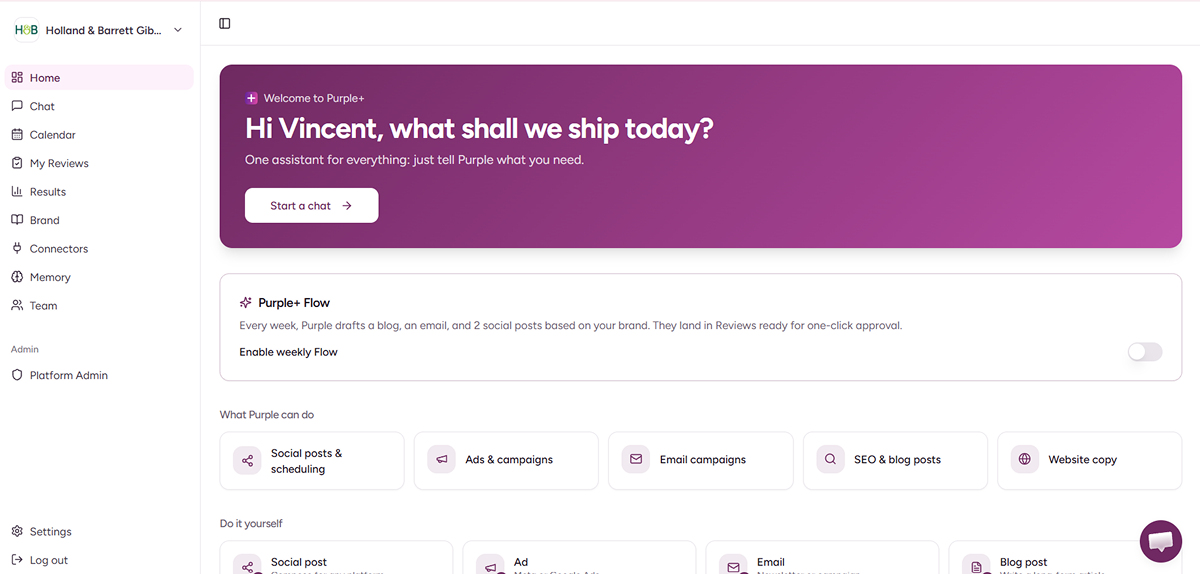
Purple+ is built around a single chat. Tell it what you want to post about, and it generates the caption, generates an image that actually matches your brand colours and logo, then either schedules it or publishes it straight to LinkedIn, Instagram, Facebook, TikTok or X.
The brand-aligned image generation matters more for solopreneurs than for anyone else. You don't have a designer. You don't have brand guidelines documents. You probably haven't even fully decided what your visual style is yet. Every other AI image tool — ChatGPT, Midjourney, Microsoft Designer, Adobe Firefly — is brand-blind. You ask for an image, you get a generic image. To make it look like it belongs in your feed, you spend 20 minutes in Canva manually adjusting colours, fonts, layout. Purple+ skips that 20 minutes.
The free tier is 100 credits per month, no credit card needed, set up in about 90 seconds. Designed for one-person operations and small teams, not enterprise.
What it doesn't do well: hand-crafted graphic design. If you want presentation slides, a print brochure or a complex layered design pulling in multiple stock photos, Canva is still the better tool. Purple+ optimises for "social posts that look like the rest of your marketing" — which is what most solopreneurs actually need, but not what every creative brief calls for.
Now, the rest of the list. Nobody should pick a tool based on what one agency says about its own product.
The Best Free Schedulers for Solopreneurs
Buffer — free for up to 3 channels
The cleanest scheduler for individuals. Free plan covers three connected social channels with 10 scheduled posts per channel queued. The AI Assistant is included even on the free tier, which is a nice surprise. If you only post to LinkedIn and Instagram and don't need anything fancy, Buffer is the simplest answer.
The catch: no analytics beyond basic engagement counts, and if you grow past three social channels you're paying.
Later — visual-first scheduler
Drag-and-drop weekly calendar that's genuinely intuitive. Free tier limited to one social profile per platform and 30 posts a month total. Better for solos who think visually about their content week — the calendar view feels less like spreadsheet drudgery than Buffer's queue.
The catch: the 30-post-a-month cap will bite if you're posting daily. And the AI features sit behind the paid plans, so you're using Later for scheduling only on the free tier.
The Best Free AI Content Tools for Captions
ChatGPT — free
The most useful $0 AI tool for solos writing their own captions. The free plan runs on GPT-4o-mini with daily limits most solopreneurs will never hit. Set up a Custom GPT with your brand voice instructions saved and you'll get ten caption variants in 30 seconds.
The catch: the default tone tends toward generic "engaging" — emojis it didn't ask for, sentence fragments for impact, that LinkedIn-influencer cadence. You'll need strong brand voice instructions to get past it.
Claude — free
Anthropic's chatbot. The article you're reading was drafted with it. For longer captions or narrative-style social content — the kind where you're telling a small story in a thread or a long-form LinkedIn post — Claude holds a consistent voice better than ChatGPT in our testing. Free tier gives you several dozen messages a day on the Sonnet model.
Use whichever you prefer. Both are excellent for caption writing. Neither will generate the image or schedule the post.
Predis.ai — AI-first social post generator
Type a topic, get a finished post with image. The free tier gives you 15 posts per month, which goes further than it sounds when you're starting out.
The catch: the AI-generated visuals have a noticeable "template" look. Same colour palettes recur, similar compositions across users. Fine for testing what AI-generated posts feel like in your feed. Less suited as your only image source long-term.
The Best Free Tools for Visuals
Canva — free with AI features
Canva's free tier includes Magic Studio: Magic Write for short copy, Magic Edit for images, AI background removal with monthly limits. For solopreneurs designing their own graphics, Canva is still the safest bet for custom one-off visuals — the template library does most of the design work for you.
The catch: a lot of the better templates and stock library content is paywalled, and you'll occasionally hit a "this is locked" surprise mid-design.
Microsoft Designer — free AI image generator
Built on DALL·E 3. Completely free with no daily limits we've hit in regular use. Excellent for hero images or one-off creative briefs.
The catch: like every general-purpose AI image tool, it has no idea what your brand looks like. Every output needs manual brand alignment afterwards. Fine for occasional creative work. Tedious for daily social content where consistency matters more than novelty.
CapCut — free video editing with AI
The most generous free tier on this entire list. CapCut is owned by ByteDance (TikTok's parent), which is why it's so well-resourced. Full AI features including auto-captioning, background removal and voice cloning — all free.
The catch: it's mobile-first, the desktop version still feels secondary, and your data is going to ByteDance. Be deliberate about what you upload.
The "You Probably Don't Need This" Tool
We mention Planable here because most "best AI social media tool" lists feature it prominently — and you might end up signing up for it thinking it's the tool you need.
It isn't, for a solopreneur. Planable is built for agencies and marketing teams who need client approval workflows on every post. It's a great tool for the right audience. If you're working alone, there's nobody to approve your posts but you, and the entire approval-workflow feature set is overhead you'll never use.
Skip it unless you grow into running social media for clients, at which point come back and look at it properly.
The Tools We Cut From This List
A handful that fail the "actually free, actually for solopreneurs" test:
-
Hootsuite — retired its free plan in 2023. Pricing starts at $99/month, designed for teams managing many brands.
-
Sprout Social — enterprise-grade. $249/month per user minimum.
-
Jasper — seven-day trial, then $39/month. AI content focused, not social-specific.
-
Sendible — agency-focused, no free tier.
-
SocialBee — limited free trial, not a permanent free tier.
If you see any of these recommended on other "best free AI social media tools for solopreneurs" lists, those lists were either written without testing or written before these tools removed their free tiers.
The Stack We'd Actually Build for a Solopreneur
After testing the lot, here are the two ways a one-person business can run social on $0 a month. Pick the one that matches how you like to work.
The simple path (one tool covers most of it)
|
Job |
Tool |
Cost |
|---|---|---|
|
Caption + brand-aligned image + scheduling + publishing across networks |
Purple+ |
Free (100 credits/mo) |
|
One-off custom graphic design |
Canva |
Free |
|
Video editing for reels and shorts |
CapCut |
Free |
Three tools, one of which (Canva) you'll touch maybe once a week, and one of which (CapCut) only if you post video.
The specialist path (best-in-class for each job)
|
Job |
Tool |
Cost |
|---|---|---|
|
Caption writing |
ChatGPT or Claude |
Free |
|
AI-generated images |
Microsoft Designer |
Free |
|
Manual graphic design |
Canva |
Free |
|
Video editing |
CapCut |
Free |
|
Scheduling |
Buffer |
Free (up to 3 channels) |
Five tools, no single hub. The advantage: best-of-breed for each job. The disadvantage: every post is a small context-switch across five logins, and your images won't be consistent because Microsoft Designer doesn't know your brand.
For most solopreneurs we work with, the simple path wins because the time saved going from idea to live post is the bit that matters most. An hour back in your day, every day, compounds.
The Honest Takeaway
If your bottleneck is content generation — the "I don't know what to post" feeling — start with Purple+ free. The brand-aligned image generation solves the "everything I post looks generic" problem most solos have, and the free tier means you don't have to commit to anything.
If your bottleneck is scheduling — you've got the content but you keep posting at the wrong times — start with Buffer's free plan and add a writing tool when you outgrow it.
If your bottleneck is video — you're trying to get into reels and TikTok and the editing is killing you — start with CapCut, layer in Purple+ or Canva for the static posts.
There's no single right answer. There is a wrong one: paying $30 a month for a tool built for marketing teams when you're a one-person business. None of those tools are on this list, and most of them won't help you.
If you want the broader picture across more than just social media, our free AI marketing tools guide covers 12 tools across copy, design, social, email and SEO. And if you want to compare Purple+ to the alternatives honestly, we wrote that page ourselves too.
Frequently asked questions
Written by
Founder & Director
Vincent Carrié is the Founder & Director of Purple Media, a full-service digital marketing agency in Gibraltar working with brands including Holland & Barrett, Vitabiotics, and Gibtelecom. Drawing on years of hands-on campaign experience, he's building Purple+ — an AI marketing agent that creates and publishes brand-aligned content across social, paid ads, SEO, and email from a single chat. He writes about applying AI to real marketing workflows, with a focus on what actually drives results for solopreneurs, SMBs, and agencies.