
Blaze AI pricing: what will your marketing actually cost?

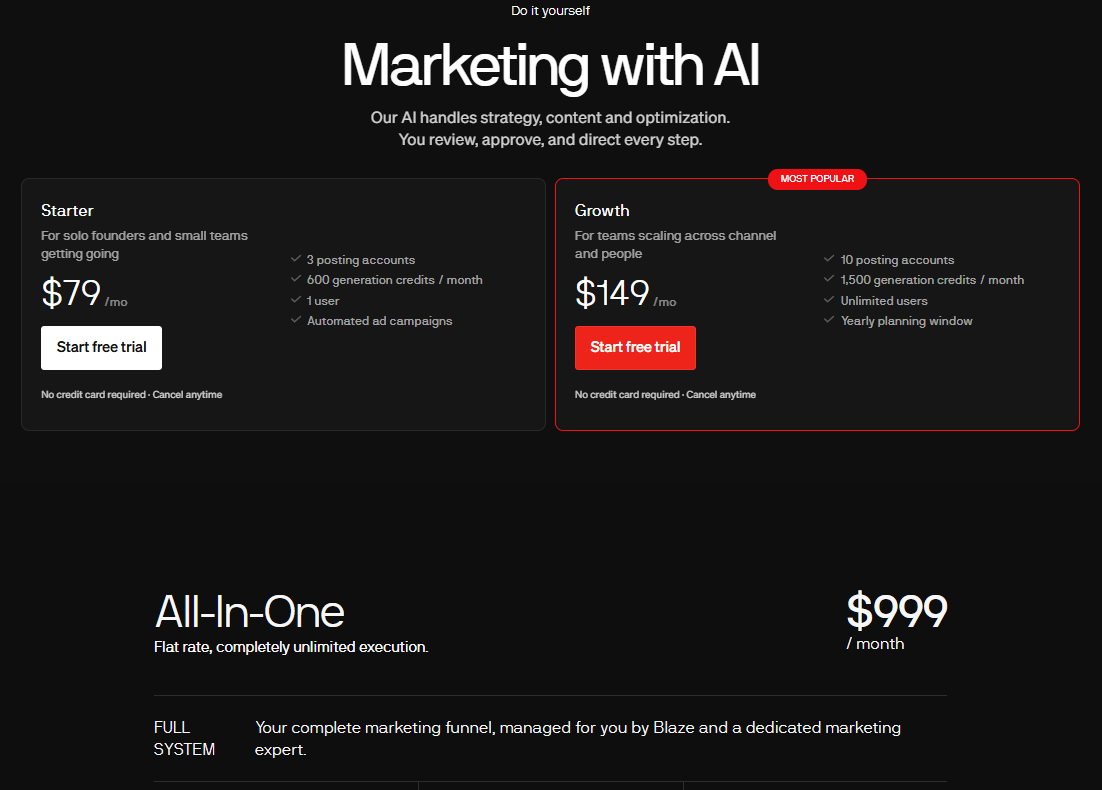
Blaze AI pricing starts at $79 per month for Starter and $149 for Growth. Its advertised All-In-One managed offer is $999 per month. Those are different purchasing decisions: a software subscription and a service that includes human delivery.
To choose sensibly, work out how much content you need, which accounts must connect and who will review the work. A cheaper subscription can still be a poor fit if it leaves your main task unfinished.
This guide explains the advertised plans, walks through a sample content budget and gives you a practical trial checklist. Purple+ publishes this comparison and competes with Blaze; product facts were checked against official sources on 30 September 2026.
Blaze AI pricing at a glance
|
Plan |
Advertised USD monthly price |
Posting accounts |
Monthly generation credits |
Users |
|---|---|---|---|---|
|
Starter |
$79 |
3 |
600 |
1 |
|
Growth |
$149 |
10 |
1,500 |
Unlimited |
|
All-In-One managed service |
$999 |
Confirm service scope |
Confirm service scope |
Confirm service scope |
Source: Blaze's official pricing page. Its advertised trial lasts seven days. Check current checkout terms before subscribing.
Use account requirements as an early filter. Write down each business profile you intend to connect, rather than simply writing “social media”. A business with several locations may have a very different requirement from an owner posting to a single company account.
Next, identify who needs access. The person preparing a campaign and the person signing it off may be different people. A suitable subscription needs to fit that relationship as well as the volume of content.
Avoid choosing the larger plan simply because the allowance looks better value per credit. Unused capacity does not help you publish useful work. Start with a realistic month, then allow room for experimentation.
How generation credits affect your budget
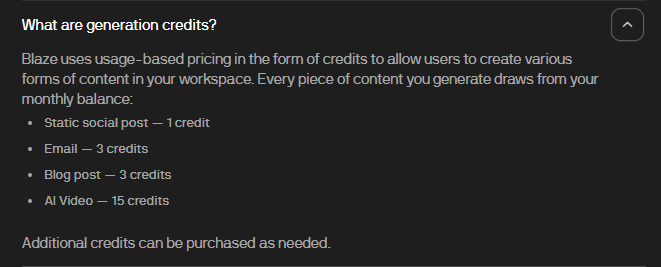
Blaze lists these generation costs:
|
Output |
Listed credits |
|---|---|
|
Static social post |
1 |
|
|
3 |
|
Blog post |
3 |
|
AI video |
15 |
Additional credits are available to purchase. Confirm top-up prices and the treatment of revisions, variants and publishing actions in your account before relying on a forecast.
A credit allowance measures eligible activity inside a product. It does not tell you how many finished assets you will approve, whether an image needs replacing or whether the first draft gets the offer right.
This distinction matters most when comparing platforms. One provider might charge for a complete output, while another charges for several actions involved in producing it. Their credit balances cannot be treated as a shared currency.
Our practical advice is to keep two totals during a trial: credits spent and usable assets completed. You need both to understand the cost of your actual workflow.
A worked monthly content budget
Imagine a small retailer planning a month around one seasonal offer. The owner wants regular social content, two useful articles, four emails and a small amount of video.
Using the listed generation rates, the first-pass calculation is:
|
Planned output |
Quantity |
Calculation |
Credits |
|---|---|---|---|
|
Static social posts |
20 |
20 × 1 |
20 |
|
Emails |
4 |
4 × 3 |
12 |
|
Blog posts |
2 |
2 × 3 |
6 |
|
AI videos |
4 |
4 × 15 |
60 |
|
Total |
30 outputs |
98 |
This is an illustrative calculation, not a tested account result. It assumes one generation for each listed output and excludes any other billable actions. Its purpose is to show why your content mix matters.
The retailer's next step is to test one small part of that plan. Generate a post, an email and a video, make the necessary edits and inspect the resulting usage. Replace the assumptions in the spreadsheet with those observations.
If several versions are needed before an asset is usable, add those costs. If a photograph supplied by the business is more appropriate than generated video, change the production plan rather than spending credits merely because they are available.
Most importantly, this example does not support the claim that a modest mixed-content schedule will automatically exhaust Starter. Account limits, collaboration requirements or another feature may drive the decision before generation volume does.
What to check beyond the subscription
Build a simple budget with four lines: software, additional usage, connected services and human time. Add advertising spend separately if you plan to run paid campaigns.
Ask which existing subscriptions you would genuinely cancel. If you still need a design tool, email service and website hosting, those costs remain in the budget. Avoid counting hypothetical savings from tools you never paid for.
Include the person who prepares the brief. Product names, stock availability, offer dates and acceptable claims must come from somewhere. Even a well-connected marketing tool needs accurate business information to work with.
Then estimate review time. For example, if a business values an owner's time at $30 an hour, three hours of review represents $90 of internal time. That is an illustrative costing choice, not an additional charge from the platform.
Expert insight: compare the cost of an approved campaign, not the cost of generating a draft. A system that gives you many versions can look productive while leaving the decision-making workload unchanged. The useful question is how much work remains before you are comfortable publishing.
For a wider view of the options, our Blaze AI alternatives guide separates social scheduling, connected marketing and broader business assistance.
Software or managed marketing?
Blaze's plan documentation distinguishes between operating the software yourself and having a human strategist set it up and run it. Decide which responsibility you want to buy before comparing prices.
With software, ask who will keep the calendar moving when business gets busy. Assign the brief, fact-checking, approval and performance review to named people. If every answer is the owner, include that commitment in the decision.
With a managed service, ask for the deliverables in writing. Clarify how many assets are included, what counts as a revision, who supplies photography and how quickly you must approve material to keep the schedule on track.
It is also worth asking what happens when priorities change. A restaurant may need to replace a planned campaign when a private event fills its available dates. A retailer may need to withdraw an offer when stock runs out.
The service should make that handover understandable. You need to know whom to contact, how the change is confirmed and what happens to anything already scheduled.
Blaze and Purple+ both offer a managed route. Compare their agreed scope rather than assuming the lowest entry price buys equivalent work. A smaller package can be appropriate for one business and inadequate for another.
How to compare Blaze and Purple+ fairly
Purple+ offers a 14-day Pro trial without a card, followed by the option to retain a limited Free plan. Standard paid pricing is $49 per month for Pro and $149 for Scale; temporary offers should be checked separately on the Purple+ pricing page.
Free currently includes one connected social profile and ten social publishes per month. It does not include automations, direct email sending or CMS publishing. Use the trial to test paid capabilities, then decide which ongoing plan matches your needs.
|
Question |
Why it matters |
|---|---|
|
Can I connect the accounts I actually use? |
A missing channel can interrupt the whole process. |
|
Can the right person review the work? |
Access needs to match your approval process. |
|
What does my sample campaign consume? |
Credit systems are not directly comparable. |
|
What remains manual? |
Editing and handovers affect the total cost. |
|
What happens after a trial or promotion? |
Your ongoing budget needs the ordinary terms. |
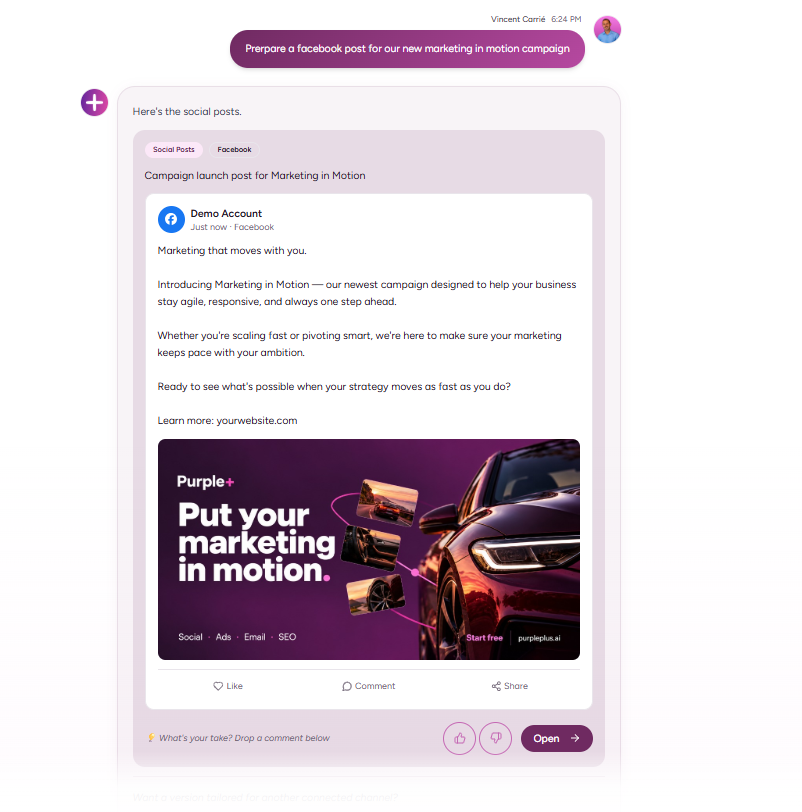
One Purple+ workflow to evaluate is working through a connected AI assistant. Its MCP connection lets supported requests from compatible ChatGPT, Claude or Gemini setups act in your Purple+ workspace, using your permissions and credits.
That connection is useful if you already develop briefs in a chat and want to continue into marketing actions. It still requires the appropriate setup, connected accounts and plan allowances. It should be demonstrated with your task rather than treated as a guarantee that every request can run automatically.
Read the Purple+ versus Blaze comparison for the direct buying decision. This article concentrates on understanding the budget behind it.
What to test before choosing a plan
Choose a campaign you genuinely intend to use. Keep it small enough to review properly: three social posts and one email can reveal more than a large batch of generic content.
Use this brief as a starting point:
Prepare three social posts and one email for our upcoming offer. Use the supplied product facts, campaign dates and brand examples. Give each post a different angle. Leave everything ready for review and list any missing information before scheduling.
Then work through these steps:
-
Supply the same inputs. Use the same offer, photographs and approved copy examples in each platform.
-
Check accuracy first. Look for invented discounts, unsupported promises and incorrect dates.
-
Edit to your normal standard. Record the corrections required, rather than accepting a weaker draft to make the tool look faster.
-
Inspect the usage. Note what the complete preparation process consumed.
-
Test a permitted publishing action. Confirm the account, timing and approval behaviour on a suitable post.
-
Record the handover. Write down what another team member would need to continue the work.
Keep the results simple: completed assets, editing time, usage and remaining manual steps. Those observations are enough to support a practical buying decision without inventing an elaborate scoring system.
If your budget is the main constraint, our guide to the best free AI marketing tools can help you consider a smaller starting workflow.
Choose around the work you need
Start with the campaign, connected accounts and people involved. Use the advertised subscription as one part of the calculation, then test the workflow closely enough to understand what you are buying.
If Purple+ looks relevant, try the same brief during its Pro trial and compare the finished work. Choose the plan that supports a sustainable marketing routine, with a clear view of the ongoing costs and the responsibilities you retain.
Frequently asked questions
Written by
Founder & Director
Vincent Carrié is the Founder & Director of Purple Media, a full-service digital marketing agency in Gibraltar working with brands including Holland & Barrett, Vitabiotics, and Gibtelecom. Drawing on years of hands-on campaign experience, he's building Purple+ — an AI marketing agent that creates and publishes brand-aligned content across social, paid ads, SEO, and email from a single chat. He writes about applying AI to real marketing workflows, with a focus on what actually drives results for solopreneurs, SMBs, and agencies.