Can ChatGPT manage your social media? Here’s what actually works

Can ChatGPT manage your social media? Yes, it can help plan content, write captions, adapt posts and interpret the results you provide. Scheduling, publishing and handling account activity depend on the connected tools and permissions available in your setup.
For a small business, the useful question is how much work remains after the chat ends. A folder full of captions can be helpful, but you still need the right images, a publishing schedule and someone checking what actually went live.
We build Purple+ to connect those jobs: create the content, review it, then schedule and publish through your connected channels. This guide explains what ChatGPT contributes, how Purple+ completes the workflow, and when a simpler setup may be enough.
Key takeaways
-
ChatGPT can help with ideas, captions and analysis; publishing requires access to a supported tool and account.
-
Purple+ brings content creation, brand-aligned visuals, approvals and scheduling into one marketing workspace.
-
You can use Purple+ directly or connect it through MCP to request supported actions from ChatGPT, with review and approval before publishing.
Can ChatGPT manage your social media in practice?
Social media management includes several different jobs. You need to decide what to say, prepare the content, get it approved, publish it, respond to people and learn from the results.
ChatGPT can contribute to many of those jobs. However, a conversation with no connection to your business accounts cannot see your unpublished Instagram drafts or check yesterday’s LinkedIn performance simply because you ask it to.
Start by separating the tasks you want help with. That makes it easier to decide whether you need a better brief, a connected publishing tool or a person to take responsibility for the work.
|
Task |
ChatGPT without connected business tools |
What completing the task requires |
|---|---|---|
|
Plan a content week |
Suggests topics and a draft calendar |
Your business goals, dates and priorities |
|
Write captions |
Produces and revises drafts |
Accurate information and a brand voice review |
|
Prepare visual concepts |
Suggests imagery and creative directions |
Suitable image tools, real assets and final checks |
|
Schedule and publish |
Can describe the intended schedule |
An authorised tool supporting that platform and format |
|
Handle comments |
Drafts replies to comments you supply |
Access to the relevant conversation and appropriate oversight |
|
Review performance |
Analyses data you provide |
Accurate exports or a supported data connection |
If writing is your biggest obstacle, ChatGPT alone may already help. If the work piles up between the draft and the published post, look closely at the publishing workflow.
What ChatGPT can do for your content
A useful starting point is turning the information you already have into content. Product details, customer questions, service explanations and your own observations give ChatGPT something specific to work with.
Imagine a car workshop that wants more bookings for winter checks. It could supply its actual service list and ask for three post ideas: what drivers should check, what happens during an appointment and how to book.
Those ideas are more useful than a request for “ten engaging posts about cars”. Each one connects a customer question with a service the workshop actually provides.
ChatGPT can also adapt the same material for different audiences. A LinkedIn post might explain a business decision, while an Instagram caption can focus on the image and one clear action.
Repurposing is another practical use. A useful article can become a short post, a question for followers and a video outline, provided each version has a reason to exist beyond repeating the headline.
For businesses working alone, our guide to AI social media tools for solopreneurs looks at the different jobs that writing, design and publishing tools can cover.
Can ChatGPT schedule and publish social media posts?
It can initiate supported publishing actions through suitable connections. Whether it can do that for your account depends on the integration, the social network, the content format and the permissions you have granted.
OpenAI’s documentation on connected apps in ChatGPT explains that some apps can take actions in external services. Having an app installed does not automatically mean it supports every action you want.
There is also a difference between scheduling a ChatGPT task and scheduling a social post. Scheduled tasks in ChatGPT can run supported work later, but a scheduled instruction does not itself supply access to your Instagram or LinkedIn account.
Before relying on a publishing workflow, check three things:
-
Is the correct business account connected?
-
Does the tool support the specific post format and action?
-
Can you verify the saved schedule or published result in the destination system?
This last check matters. “Here is your post for Friday” may mean the assistant has drafted something intended for Friday. A scheduling confirmation should identify the account, content, date, time and time zone.
Purple+ offers a connection that lets a compatible AI assistant request marketing actions within your Purple+ workspace. Its published workflow includes review and approval through an action panel before content goes live.
You can see how that works on the connect Purple+ to your AI assistant page. Availability still depends on your assistant setup and the channels you have connected.
Ready to put the posts into your calendar? Create your content, review the artwork and schedule the week in Purple+.
Three ways to use ChatGPT for social media
You do not have to replace a working setup simply because another tool exists. Choose according to the part of the process that currently takes the most effort.
|
Approach |
Best suited to |
Work you still own |
|---|---|---|
|
ChatGPT and manual publishing |
A business posting occasionally to one account |
Moving content, uploading assets and posting on time |
|
ChatGPT and a separate scheduler |
Someone who already has a reliable scheduling routine |
Transferring drafts, matching assets and checking the queue |
|
Purple+, directly or connected to ChatGPT |
A business coordinating content creation, approvals and publishing |
Briefing, review, approval and decisions about results |
Manual publishing can be perfectly reasonable at a small scale. If you publish twice a week and enjoy making the final changes inside Instagram, there may be little value in adding more software.
A separate scheduler makes sense when content is ready but posting consistently is difficult. ChatGPT can help prepare the material while the scheduler handles the queue.
A connected workflow becomes more useful when each post creates several handovers. Purple+ brings planning, content, approvals and publishing into a shared workspace through its social media management platform.
Our practical view: measure the effort needed to finish an approved post. A tool that produces more options can still create extra work if someone must repeatedly correct them, find the matching image and rebuild the schedule elsewhere.
How to plan and schedule a week of posts with Purple+
Here is an illustrative workflow for a car workshop promoting winter vehicle checks. The business wants local drivers to understand the service and book an appointment; it needs three useful posts for Facebook and Instagram.
1. Give Purple+ the brief. Supply the services actually included, the booking link, your audience and the tone you want. Add your brand details and approved photographs so the content reflects the business customers will visit.
For example:
Plan three posts for our winter vehicle checks next week. Use the service details and booking link below. Suggest one educational post, one explanation of the service and one booking reminder. Prepare separate Facebook and Instagram captions. Use our workshop photos where relevant. Ask me for any missing facts and keep everything as drafts for review.
2. Choose the ideas before producing the full set. Review the proposed topics and remove anything that does not match the offer. A simple plan could look like this:
|
Post |
Message |
Visual direction |
Intended action |
|---|---|---|---|
|
Monday |
What to check before a winter journey |
An approved tyre inspection photograph |
Read the practical advice |
|
Wednesday |
What the workshop’s service includes |
A branded graphic using confirmed service details |
View the service information |
|
Friday |
How to arrange a vehicle check |
An approved workshop photograph |
Book an appointment |
These are suggested slots, not a claim about the best posting days. Choose times that suit your audience and operating hours.
3. Create the captions and visuals in Purple+. Ask for the approved ideas to become platform-specific drafts. Generate a brand-aligned graphic for the service explanation and use real photographs for posts showing the workshop or its work.
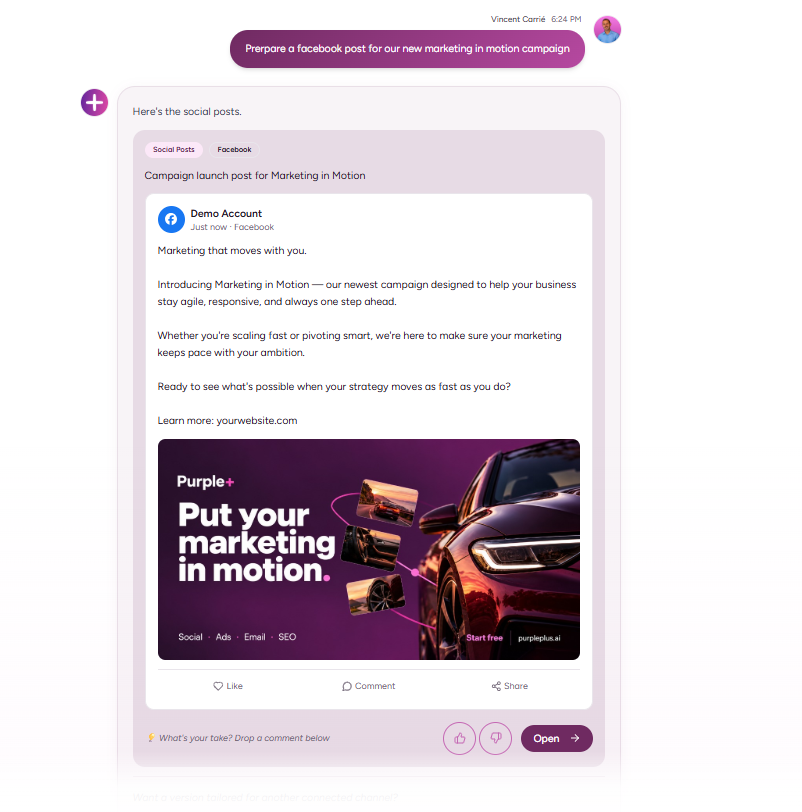
4. Review each complete post. Read the caption alongside the image and check the destination link. Confirm that the service description is accurate and that a generated graphic has not added an offer or claim you did not supply.
5. Approve and schedule. Select the connected Facebook and Instagram accounts and confirm the dates, times and time zone. Complete the approval step, then check that the saved entries show the intended content and schedule in Purple+.
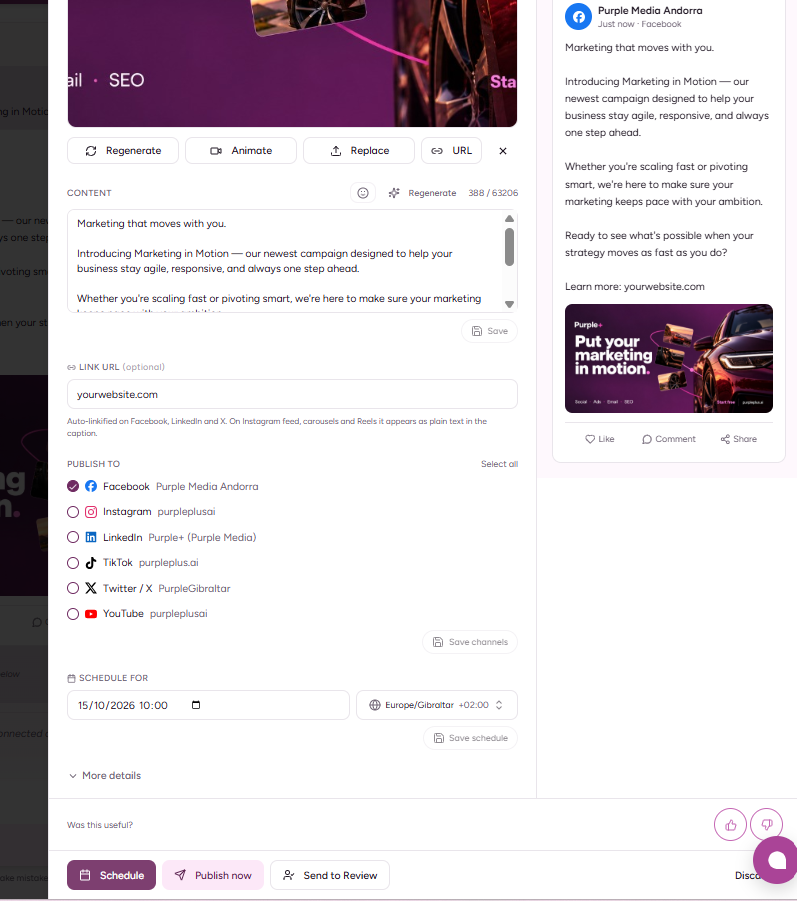
6. Check publication and decide what to repeat. Confirm that the posts went live, then review available results and relevant enquiries. A question customers keep asking could become next week’s educational post.
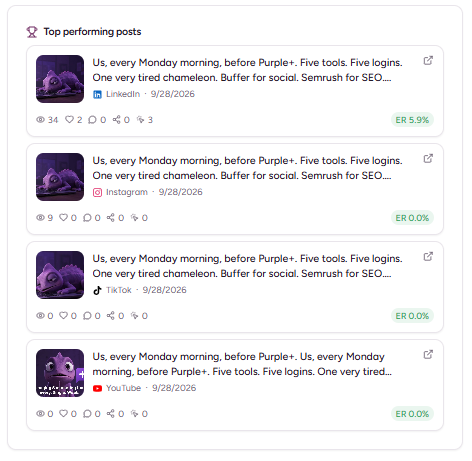
You can follow this process directly in Purple+. If you prefer working in ChatGPT, connect Purple+ through MCP and request the supported actions there, then follow the Purple+ action panel to review and approve the work.
The useful result is a reviewed content week with a saved publishing schedule. Our guide to AI marketing automation for small businesses explains how that process can extend into wider campaigns.
Three prompts worth saving
Good ChatGPT social media prompts describe the business, the task and the limits. You should be able to see what the result is meant to achieve before reading the output.
Prompt 1 — Plan the week
Help me plan three social posts for [business] aimed at [audience]. This week’s goal is [goal]. Use only these approved facts: [facts]. Propose a topic, customer question, format and call to action for each post. Avoid repeating the same message. Flag anything you need me to confirm before drafting.
Use this before asking for finished captions. It gives you a chance to reject ideas that sound fine but have little connection to the business.
Prompt 2 — Adapt one idea for different platforms
Turn this approved idea into separate Instagram, Facebook and LinkedIn drafts: [idea]. Use these facts and this brand voice: [details]. Adapt the emphasis and structure to each platform. Suggest a visual using the assets I have: [assets]. Do not invent testimonials, results, prices or availability. Keep the content as drafts for review.
This is particularly helpful when the same campaign needs to appear across several channels. Ask for a distinct reason to read each version rather than three lightly reworded captions.
Prompt 3 — Prepare an approved post for scheduling
Using Purple+, prepare this approved caption and asset for [specific account] on [date] at [time and time zone]. Preserve the approved copy. Show the destination, asset, link and schedule for review before taking the publishing action. If this format or action is unsupported, tell me. After approval, report the saved status and any failure.
The third prompt requires a working connection; it is not a way to give an unconnected chat access to an account. OpenAI explains the relationship between access and action approvals in its guide to managing app permissions.
Where human judgement still matters
The business needs someone who knows whether a message is appropriate today. A scheduled promotion can become wrong because a product sells out, an event changes or customers raise an issue that needs attention.
Keep a person responsible for offers, factual claims and sensitive replies. ChatGPT can suggest a response to a complaint, but it should not promise a refund or explain an incident using information nobody has verified.
Brand voice also needs a stronger check than “make it friendly”. Give the assistant examples of language you use, phrases you avoid and the level of detail your customers expect.
Visuals deserve the same care. An attractive generated image may be useful for a concept, but it should not misrepresent the room a guest will book, the car a customer will view or a product you sell.
If you want more ideas for combining writing and design tools, our free AI marketing tools guide provides a wider starting point. Check current plan limits before building a workflow around a free allowance.
How to tell whether the workflow is helping
Start with a simple record of what happens over several weeks. Track how much time you spend preparing and checking posts, how many revisions they need and whether they publish as planned.
Then look at the business response. A post that produces relevant enquiries may be more valuable than one that gets plenty of reactions from people who are unlikely to buy.
Useful measures include:
-
Approved posts published successfully.
-
Time spent briefing, editing and scheduling.
-
Website visits from tagged social links.
-
Relevant messages, enquiries or bookings.
-
Themes that repeatedly attract useful responses.
ChatGPT can help interpret an export, but it needs the underlying figures and definitions. Ask it to separate observations from possible explanations, particularly when the sample is small.
A better-performing week does not prove that the AI caused the improvement. The offer, timing, audience and creative may all have changed, so use the results to choose the next test.
Use Purple+ to take your social media from idea to published post
If you want help running your social media, Purple+ brings the work together: planning the content, creating captions and brand-aligned visuals, reviewing drafts, and scheduling or publishing to your connected accounts. You can work directly inside Purple+ without using ChatGPT as a separate step.
Give Purple+ a brief about your business, audience and offer, then review the content it prepares. You can refine the wording and visuals before approving the posts and putting them into your publishing calendar.
For a small business, that means a more practical way to complete the week’s marketing. The content and the publishing workflow sit together, so you can see what needs reviewing and what is ready to go out.
What you can bring into that workflow:
-
Content planning: turn a business brief into ideas and a posting schedule.
-
Caption creation: prepare and adapt copy for the channels you use.
-
Brand-aligned visuals: generate imagery using your brand’s colours, logo and direction.
-
Review and approval: check the complete content before it goes live.
-
Scheduling and publishing: send approved posts to supported connected social accounts, immediately or at a scheduled time.
-
A shared calendar: keep upcoming content organised in one workspace.
Purple+ also brings social content alongside email, SEO content and advertising. That is useful when the same offer needs to appear across several parts of your marketing, with a consistent message.

Prefer ChatGPT? Connect Purple+ through MCP
You can also use ChatGPT as the place where you give the instructions. Purple+ offers an MCP connection—Model Context Protocol—which allows a compatible ChatGPT setup to request actions in your Purple+ workspace.
Connect Purple+, authorise access and select the right workspace. You can then ask ChatGPT to create social content or prepare a publishing action through Purple+, using the supported tools and accounts you have connected.
For example:
Using Purple+, draft three social posts for our winter vehicle checks, with captions and brand-aligned images. Prepare them for our connected Facebook and Instagram accounts next week. Show me the drafts and proposed schedule for approval before anything goes live.
ChatGPT handles your instructions; Purple+ supplies the marketing workflow and the connection to your channels. Follow the action panel into Purple+ to review and approve the work, then verify the saved schedule or publishing result.
The MCP connection does not remove the approval step or extend the permissions of your accounts. Supported actions depend on your ChatGPT setup, Purple+ access and the connected platform and format.

Start with one week of social content
ChatGPT can help you manage social media, and Purple+ gives you a way to turn that help into scheduled, published work. Choose whether to work in Purple+ directly or connect it to ChatGPT through MCP; either way, you keep control of the content you approve.
Start with a brief, a few posts and a clear business goal. Explore Purple+ social media management, or connect Purple+ to ChatGPT if you want to run the workflow from the chat you already use.
Frequently asked questions
Written by
Founder & Director
Vincent Carrié is the Founder & Director of Purple Media, a full-service digital marketing agency in Gibraltar working with brands including Holland & Barrett, Vitabiotics, and Gibtelecom. Drawing on years of hands-on campaign experience, he's building Purple+ — an AI marketing agent that creates and publishes brand-aligned content across social, paid ads, SEO, and email from a single chat. He writes about applying AI to real marketing workflows, with a focus on what actually drives results for solopreneurs, SMBs, and agencies.