How to Create Ads With AI

AI can help create ad copy, visual concepts and multiple creative variations from a single advertising brief. This process helps businesses produce ads for different audiences, platforms, or campaign objectives without creating every version manually.
To create ads with AI, you need more than a short prompt. AI needs information about the product, target audience, offer, advertising objective and platform to produce relevant advertising assets.
The process can be broken into five stages: define the campaign, prepare the brief, generate the ads, review the output and test the approved versions.
What Do You Need to Create Ads With AI?
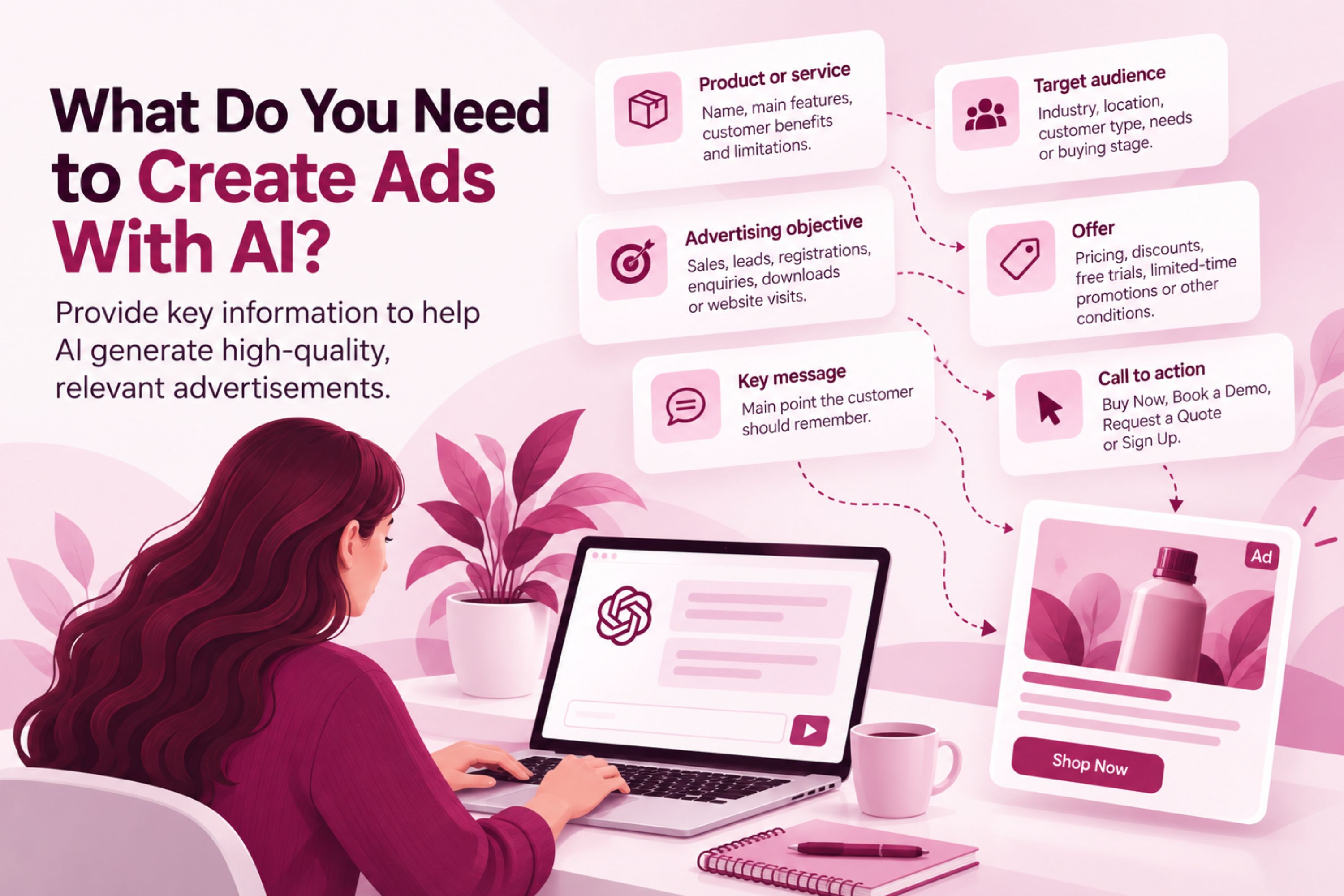
Before using AI to generate an advertisement, collect the information it needs.
Product or service
Provide the name of the product or service, its main features, customer benefits and any important limitations.
Target audience
Describe the people the advertisement should reach. Include relevant characteristics such as industry, location, customer type, needs or stage in the buying process.
Advertising objective
State what the ad should achieve. Common objectives include sales, lead generation, registrations, enquiries, downloads or website visits.
Offer
Give AI the exact offer being promoted, including pricing, discounts, free trials, limited-time promotions or other conditions.
Key message
Define the main point the customer should remember after seeing the ad.
Call to action
Specify the action you want the customer to take, such as Buy Now, Book a Demo, Request a Quote or Sign Up.
This information gives AI a clear framework for creating the advertisement.
How to Create Ads With AI Step by Step
Start using AI to create ads with a campaign brief, not the AI tool itself.
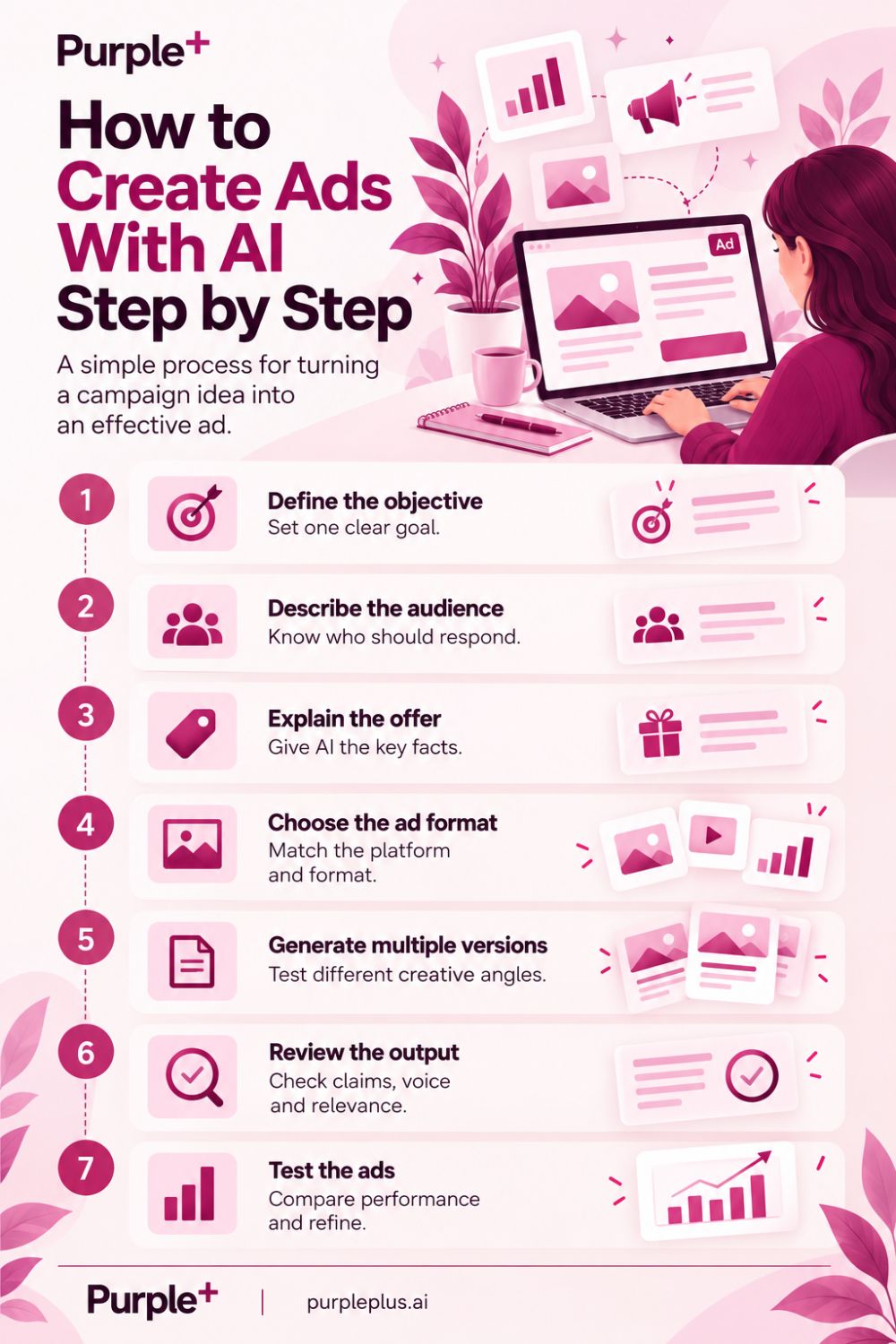
1. Define the Advertising Objective
Start with one clear objective.
For example:
Generate demo requests from small business owners interested in marketing software.
This gives the AI a specific commercial outcome to support.
2. Describe the Audience
Explain who should respond to the advertisement.
Instead of:
Create an ad for marketing software.
Use:
Create an ad for marketing software aimed at small business owners who manage their own marketing and want to reduce the number of separate tools they use.
The second instruction gives AI information about the audience and its likely problem.
3. Explain the Offer
Provide accurate product information and identify the benefit that should receive the most attention.
AI should not be expected to invent product features or claims. Give it the facts that can be used in the advertisement.
4. Choose the Ad Format
Specify where the advertisement will appear.
A Google Search ad requires short headlines and descriptions. A Meta ad may require primary text, a headline and visual creative. Other platforms have their own formats and requirements.
5. Generate Multiple Versions
Ask AI for several versions with meaningful differences.
For example, one version could focus on saving time, another on reducing marketing costs and another on managing multiple channels from one platform.
This is more useful than generating several versions that use almost identical wording.
6. Review the Output
Check every AI-created ad before publication.
Review the product information, claims, pricing, brand voice, audience relevance, call to action and landing-page consistency.
7. Test the Ads
Use the approved versions in the relevant advertising platform and compare their performance.
The results can inform the next round of creative development.
How to Generate Ads With AI
Businesses can generate ads with AI by giving the system a structured prompt with campaign information.
A useful prompt might include:
Create three Google Search ad variations for [product].
Target audience: [audience].
Objective: [objective].
Main benefit: [benefit].
Offer: [offer].
CTA: [CTA].
Create different messaging angles for each variation.
The request should specify what needs to be different between the versions.
For example, ask for one problem-focused ad, one benefit-focused ad and one offer-focused ad. This creates variations that can support a real testing plan.
What Can AI Create for an Ad?
When you create ads with AI, you can use it for different advertising assets, not just complete advertisements.
Ad copy
AI can produce:
-
Headlines
-
Primary text
-
Descriptions
-
Calls to action
-
Hooks
-
Short promotional messages
Visual concepts
AI can help develop ideas for images, layouts, product scenes and other visual directions.
Video concepts
AI can assist with scripts, storyboards, scene ideas and variations for short-form advertising video.
Creative variations
AI can adapt the same campaign message for different audiences, formats and platforms.
The marketer should provide the core proposition and check that every generated version remains accurate.
AI Create Ads for Different Audiences
The AI create ads approach becomes useful when the same product needs different messages for different customer groups.
For example, a marketing platform could be promoted to:
-
Small business owners
-
Marketing managers
-
Ecommerce teams
-
Agencies
The product does not change, but the problem highlighted in the advertisement can.
A small business owner may respond to a message about saving time, while a marketing manager may be more interested in coordinating campaigns across multiple channels.
AI can produce these variations from the same product information while the marketer controls the positioning.
How to Create Google Ads With AI
Google Search advertising requires close alignment between keywords, search intent, ad copy and the landing page.
AI can help create headline and description variations based on the target search terms and campaign proposition.
When reviewing AI-generated Google Ads, check:
-
Search intent
-
Keyword relevance
-
Product accuracy
-
Character requirements
-
Calls to action
-
Landing-page consistency
-
Advertising claims
Purple+ provides Google Ads management, including AI-assisted campaign creation and optimisation. This connects AI-assisted ad creation with campaign management and optimisation.
How to Create Meta Ads With AI
Meta ads provide more creative flexibility than search ads, making AI useful for generating different combinations of copy and visual concepts.
A campaign can use several versions of:
-
Primary text
-
Headlines
-
Images
-
Videos
-
Calls to action
When using AI to create Meta ads, the variations should have a clear purpose. For example, test a product benefit against a customer problem rather than changing a few words without changing the message.
Purple+ Meta Ads management combines AI-assisted ad creation with campaign management, so you can handle creative production and paid social activity in the same workflow.
How to Create Ad Copy With AI
AI can produce multiple versions of advertising copy from one well-defined brief.
Give it the following information:
Audience + problem + product + benefit + offer + CTA + tone
For example:
Write three short ads for marketing software aimed at small businesses. Focus on reducing the time spent managing multiple marketing tools. Use a professional tone and end with a demo-focused CTA.
You can then request different approaches:
-
Problem-focused
-
Benefit-focused
-
Outcome-focused
This creates meaningful creative differences while keeping the underlying proposition consistent.
How to Create Ad Images With AI
AI can also assist with the visual side of advertising.
Start by describing:
-
The product
-
The target audience
-
The visual concept
-
The setting
-
The desired mood
-
Important brand requirements
-
The advertising format
For a product advertisement, provide accurate information about the product's appearance. AI-generated visuals should not show features, packaging or results that do not exist.
For service advertising, visual concepts can focus on the customer problem, desired outcome or context in which the service is used.
Review the resulting image alongside the ad copy so the visual and written messages communicate the same proposition.

AI-Generated Ads: What Should You Check?
Check AI-generated ads for accuracy before publishing.
Pay particular attention to:
Product claims
Make sure every feature and benefit mentioned actually applies to the product.
Promotional information
Check prices, discounts, dates, guarantees and other commercial details.
Brand language
Remove phrases that do not match the company's normal communication style.
Audience relevance
Make sure the message addresses the intended customer's actual problem rather than a generic need.
Landing page consistency
The customer should find the same offer and core message after clicking the advertisement.
Platform requirements
Check the advertising rules and format requirements of the platform where the ad will appear.
How to Use AI-Created Ads for Testing
AI-created ads can make it easier to test different advertising messages.
Instead of producing many random variations, create versions based on defined hypotheses.
For example:
|
Test angle |
Main message |
|
Problem |
Reduce the time spent managing marketing |
|
Benefit |
Manage multiple marketing activities in one place |
|
Cost |
Reduce the need for multiple marketing tools |
|
Convenience |
Simplify day-to-day marketing management |
Each variation has a different reason for being tested.
Performance data can then show which message deserves further development.
How AI-Generated Ads Can Be Improved
Treat the first AI output as a starting point, not a finished advertisement.
Improve the generated copy by asking specific questions:
-
Is the main benefit immediately clear?
-
Does the first line address the audience?
-
Is the offer specific?
-
Is there unnecessary wording?
-
Does the CTA match the campaign objective?
-
Does the advertisement make a claim that needs evidence?
-
Does the message match the landing page?
This review process usually produces a stronger result than simply asking AI to “make the ad better.”
When Should You Use AI to Create Ads?
AI is particularly useful when a campaign requires multiple ad versions, several audience segments, or creative adapted for different platforms.
It can also reduce the production time required for recurring campaigns where similar assets need to be created regularly.
AI is less useful when the campaign proposition hasn't been defined. Generating more creative doesn't solve an unclear offer or a poorly defined audience.
The most effective workflow is:
Define → brief → generate → review → test → refine
Where Purple+ Fits Into AI Ad Creation
AI ad creation becomes more useful when the generated assets can move directly into campaign management and optimisation.
Purple+ connects AI-assisted advertising with Google Ads management, Meta Ads management and broader marketing automation.
This lets businesses work across ad creation, campaign execution, and performance analysis instead of treating AI-generated creative as a separate activity.
The focus remains on the advertising campaign: define the audience and offer, create relevant variations, approve the strongest assets, test them and use performance data to improve the next round.
Frequently asked questions
Written by
AI & SEO Content writer
Tetiana Reusche is an SEO Content Strategist and AI marketing specialist who specialises in creating content that helps businesses improve their online visibility and turn organic traffic into business growth. Her work combines search strategy, content marketing, and AI-driven optimisation to produce content that performs across search engines, answer engines, and modern AI-powered discovery platforms. Over the years, she has developed SEO strategies and content frameworks for companies in the SaaS, software, miltech, travel, real estate, home renovation, lifestyle, and entertainment industries. She enjoys translating complex topics into practical, engaging content that is valuable for both readers and search engines. Tetiana focuses on building topical authority through strategic keyword research, content planning, search intent analysis, and well-structured content ecosystems. She regularly creates keyword clusters, content recommendations, editorial roadmaps, and SEO strategies that help brands reach the right audience, strengthen their authority, and generate meaningful business results. Her articles explore SEO, AI-powered marketing, social media management, content strategy, and digital growth, with a practical focus on helping businesses create discoverable, useful content designed to convert.